NOTES FROM THE OPERATION
AKAN CRM: Connecting Orders, Stock and Warehouse Work
See how AKAN CRM brings orders, invoices, stock locations and warehouse workflows together, with role-based access and a browser-based PDA workspace.
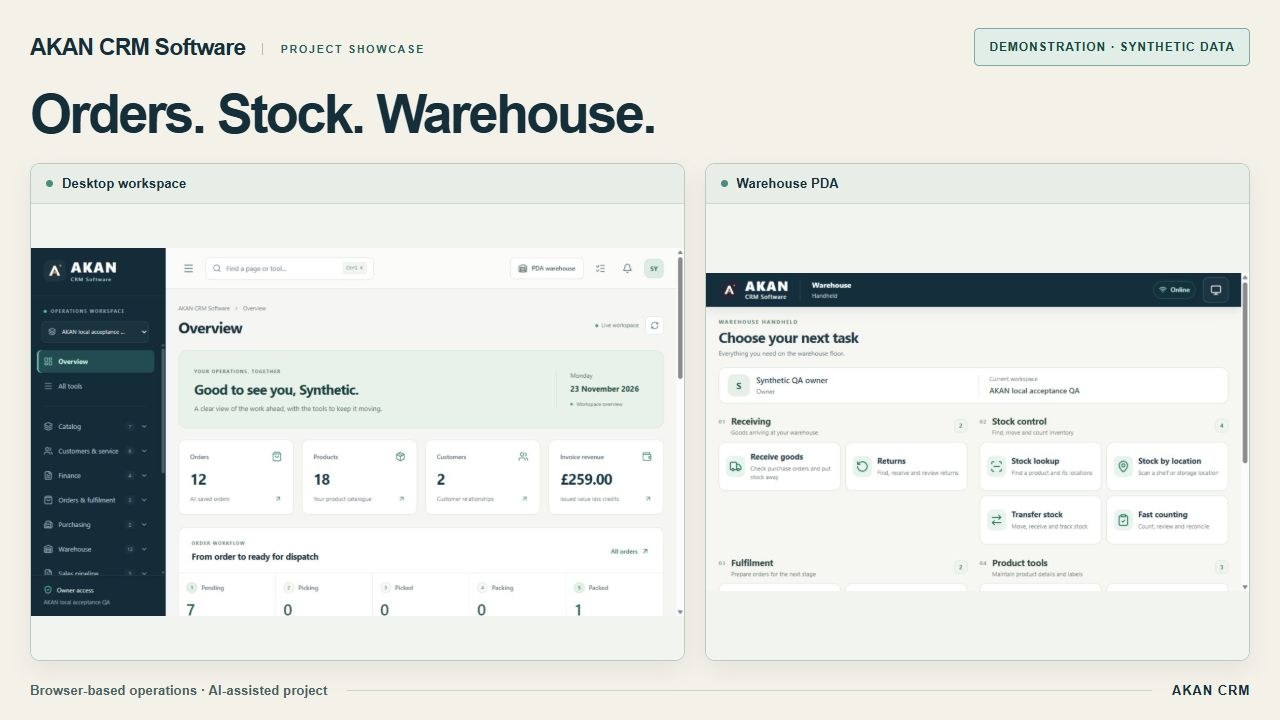
An order is straightforward until the information around it becomes fragmented. A customer changes their request, an invoice needs checking, and the warehouse needs to know which shelf holds the stock. Each handover depends on someone finding the right record.
I developed AKAN CRM Software to bring those operational steps into one working system. The project combines customer and order records with invoicing, purchasing and warehouse workflows, including a focused browser-based PDA interface. It reflects the questions I care about in e-commerce operations: what needs doing, who can do it, and how the next person knows it is complete.
The cover shows the actual desktop and PDA interfaces using synthetic demonstration data.
Built around the work behind an order
The starting point was the relationship between records. Products need identifiable stock. Orders need customers and fulfilment progress. Incoming goods need an expected purchasing record. Returns need an inspection decision before stock becomes available again.
AKAN brings these areas together:
- Customer, supplier and product records alongside sales orders and invoices.
- Purchasing and goods receiving, so incoming quantities have a record to be checked against.
- Stock locations, transfers, fast counting and stock checks.
- Picking, packing, dispatch preparation and returns handling.
- User accounts, roles and permissions for different responsibilities.
The aim is to give an office user and a warehouse colleague a coherent view of the same work, while keeping their everyday screens relevant to their jobs.
A practical journey through the warehouse
Consider an illustrative delivery of 20 units of a demonstration product. The product name, quantities and locations in this example are sample data.
The expected delivery starts with its purchasing record. Receiving staff check what has arrived, record the accepted quantity and identify its stock location. A discrepancy needs attention at this stage; an expected quantity is not confirmation that the physical goods arrived.
When an order requires two units, the warehouse needs a clear product, location and quantity to pick. Packing provides the next checkpoint before dispatch. The associated order and invoice give the office team the commercial context without asking a picker to navigate every financial detail.
If a unit comes back, the return needs a reason and an inspection outcome. A saleable item and a damaged item require different treatment. The returns workflow gives that decision a place in the system instead of leaving it in a message between colleagues.
Stock transfers and counts support the same discipline. Moving goods between locations should leave a usable record; finding a counting difference should lead to a review. These are the details that make an inventory system useful beyond displaying a total.
A PDA workspace for warehouse tasks
A desktop screen full of records is awkward on a small warehouse device. I therefore included a separate browser-based PDA workspace, designed around a seven-inch screen and the tasks an operator needs in front of them.
Receiving, picking, packing, transfers, counts and returns belong close to the action. Larger controls, a focused task layout and barcode-oriented input help make that possible. Browser access also gives the project a practical route onto suitable Android warehouse devices without a separate native application.
Screen design is only part of that work. A physical device still needs checking with its own scanner, keyboard behaviour and warehouse network. The browser implementation provides the foundation for that device-specific validation.
Access that follows responsibility
An administrator, warehouse manager and warehouse operator need different access. AKAN includes accounts and permissions so that responsibilities can be assigned deliberately, rather than giving every user the same view and authority.
This matters when a routine task sits beside a sensitive action. Looking up stock, adjusting a quantity and managing users are separate responsibilities. The project includes permission checks alongside its user interface, so access control is part of the workflow rather than just a hidden menu item.
Developed with AI assistance, checked through behaviour
I used AI-assisted development to build and refine the software, with iterative review and testing of the resulting workflows. Being candid about that process matters: useful software depends on what the implementation does when people use it.
The project's recorded verification milestone on 12 November 2026 included 359 automated checks and a separate set of 707 HTTP checks. Those figures describe engineering verification at that point in development. They do not establish customer adoption, commercial returns or performance at every operating scale.
The achievements I can demonstrate are concrete: connected internal modules, a dedicated PDA workspace, configurable access and exercised application behaviour. Measuring time saved or fewer warehouse errors would require a real operational baseline and subsequent observation.
A foundation for the next operational step
The project also includes infrastructure for future eBay and Royal Mail connections, tested with simulated responses. Live account authorisation and end-to-end provider checks remain necessary before using those services. Email and telephone integrations are outside the connected scope described here.
For a smaller replenishment question, my Stock Reorder Calculator provides a separate browser-based planning tool. AKAN addresses the broader relationship between records, people and warehouse tasks.
If you would like to discuss the project or the operational problem behind a similar workflow, send me a professional enquiry.