BY ALI KARMAND · 18 OCTOBER 2026
A CCTV bundle can combine several recorder channel counts, camera quantities and hard-drive capacities. Each combination needs its own price and SKU. I built eBay Price Wizard to apply those rules consistently across a compatible variation grid.
The problem: repeated entry across product combinations
For each variation, the seller needs to identify the recorder, multiply the camera price by the camera count, add the selected storage cost and enter a suitable SKU. Repeating that manually means keeping the same pricing and naming rules in mind across many rows.
The task calls for consistency as well as speed. A price needs to match its exact bundle, and the SKU should describe the product combination clearly enough for later stock and fulfilment work.
The approach: separate the inputs from the repetitive work
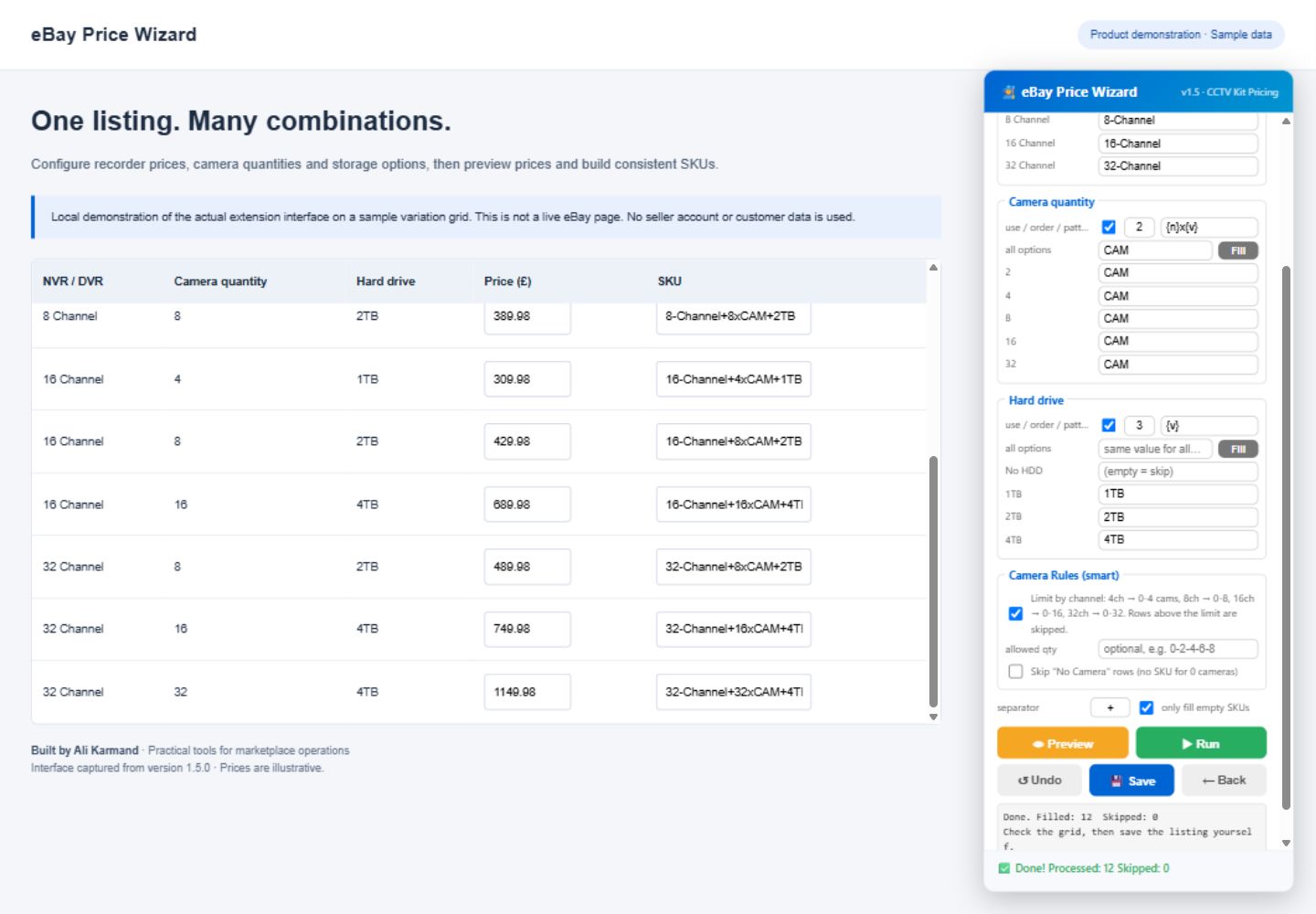
I designed a floating wizard beside the variation grid. The pricing steps collect recorder base prices, one camera price and enabled hard-drive capacities with editable costs. The extension reads the variation options, calculates a price and writes it to the matching price input.
A separate SKU Wizard maps option values to tokens. The seller chooses which columns to include, their order, patterns and a separator. Camera rules can skip quantities above the recorder’s channel limit. Preview lets the seller check the proposed SKU strings before filling the grid.
Before and after: one sample CCTV bundle
This example uses demonstration inputs: an 8-channel recorder at £119.99, four cameras at £25 each and a 1TB hard drive at £49.99. No promotional adjustment is applied.
Manual workflow
- Find the 8-channel recorder price.
- Calculate four cameras × £25.
- Add £49.99 for the hard drive.
- Enter the price and assemble the SKU.
- Repeat the same process for the next combination.
With the wizard
Enter the component prices once and configure the SKU tokens.
- Calculated price
- £119.99 + 4 × £25 + £49.99 = £269.98
- Example SKU
8-Channel+4xCAM+1TB
The seller reviews the populated grid and saves the listing themselves.
What I checked
In a local demonstration with 12 CCTV combinations, the pricing run filled all 12 expected prices. After mapping camera options to a CAM token, the SKU run filled all 12 SKU fields. Undo restored the mounted SKU inputs to their original blank values.
Reviewing the preview workflow exposed a row-identification issue. I corrected it for version 1.5.1 and checked that price Preview counts 10 eligible rows without changing fields, then a following Run fills all 12 prices correctly. Only-empty mode was also checked to preserve prices that had already been filled.
These are functional checks on sample data, not measured productivity improvements. I have not claimed a percentage time saving, a financial uplift or independently measured commercial results. Compatibility with eBay’s changing editor, frames and virtualized rows needs checking in the intended environment.
Keep the seller in control
The extension offers only-empty controls and a Stop button. SKU Undo is limited to fields that are still mounted on the current page; price filling has no built-in Undo. The extension does not submit the listing. The seller checks prices, SKUs and product fit before saving.
Processing takes place in the browser. The reviewed code contains no analytics or external network requests. SKU preferences, including option-to-token mappings, are kept in eBay’s local browser storage. The direct-download package includes installation, update and privacy information.
What this project demonstrates
This build connects practical marketplace knowledge with lightweight automation: understanding how product variations affect pricing, making SKU conventions explicit, providing a workflow people can review and checking that the tool writes the intended result.
The same approach informs my Stock Reorder Calculator: turn operational inputs into a clear next action, show the assumptions and keep the final decision with the user.